


'%20x='0'%20y='0'%20height='100%25'%20width='100%25'%20%0A%20%20%20%20%20%20%20%20%20%20xlink%3Ahref='data:image/jpg;base64,/9j/2wBDAAYGBgYHBgcICAcKCwoLCg8ODAwODxYQERAREBYiFRkVFRkVIh4kHhweJB42KiYmKjY+NDI0PkxERExfWl98fKf/2wBDAQYGBgYHBgcICAcKCwoLCg8ODAwODxYQERAREBYiFRkVFRkVIh4kHhweJB42KiYmKjY+NDI0PkxERExfWl98fKf/wgARCAAGAAoDASIAAhEBAxEB/8QAFgABAQEAAAAAAAAAAAAAAAAAAAYH/8QAFQEBAQAAAAAAAAAAAAAAAAAAAgP/2gAMAwEAAhADEAAAAKHIio//xAAfEAAABQQDAAAAAAAAAAAAAAABAgMEBQAGERYTgbL/2gAIAQEAAT8Aazknq0muc7XmImGDg2DPqjXDcwmEdgc9JJ1//8QAGhEBAAEFAAAAAAAAAAAAAAAAAQACAxEikf/aAAgBAgEBPwC7kTarrP/EABcRAAMBAAAAAAAAAAAAAAAAAAACESH/2gAIAQMBAT8AXaf/2Q=='%3E%3C/image%3E%3C/svg%3E)

The latest Mounts of Mayhem drop is here, and players are wondering how to install Minecraft Fabric 1.21.11 and deploy mods to enhance their yearning for the mines. Fabric is one of the most popular modding APIs, allowing players to try thousands of mods. Following the latest update, a new version of the API has been released, letting players update their builds and continue their modding journey.
Here's how you can install Minecraft Fabric 1.21.11.

Guide to install Minecraft Fabric 1.21.11
1) Install Fabric 1.21.11
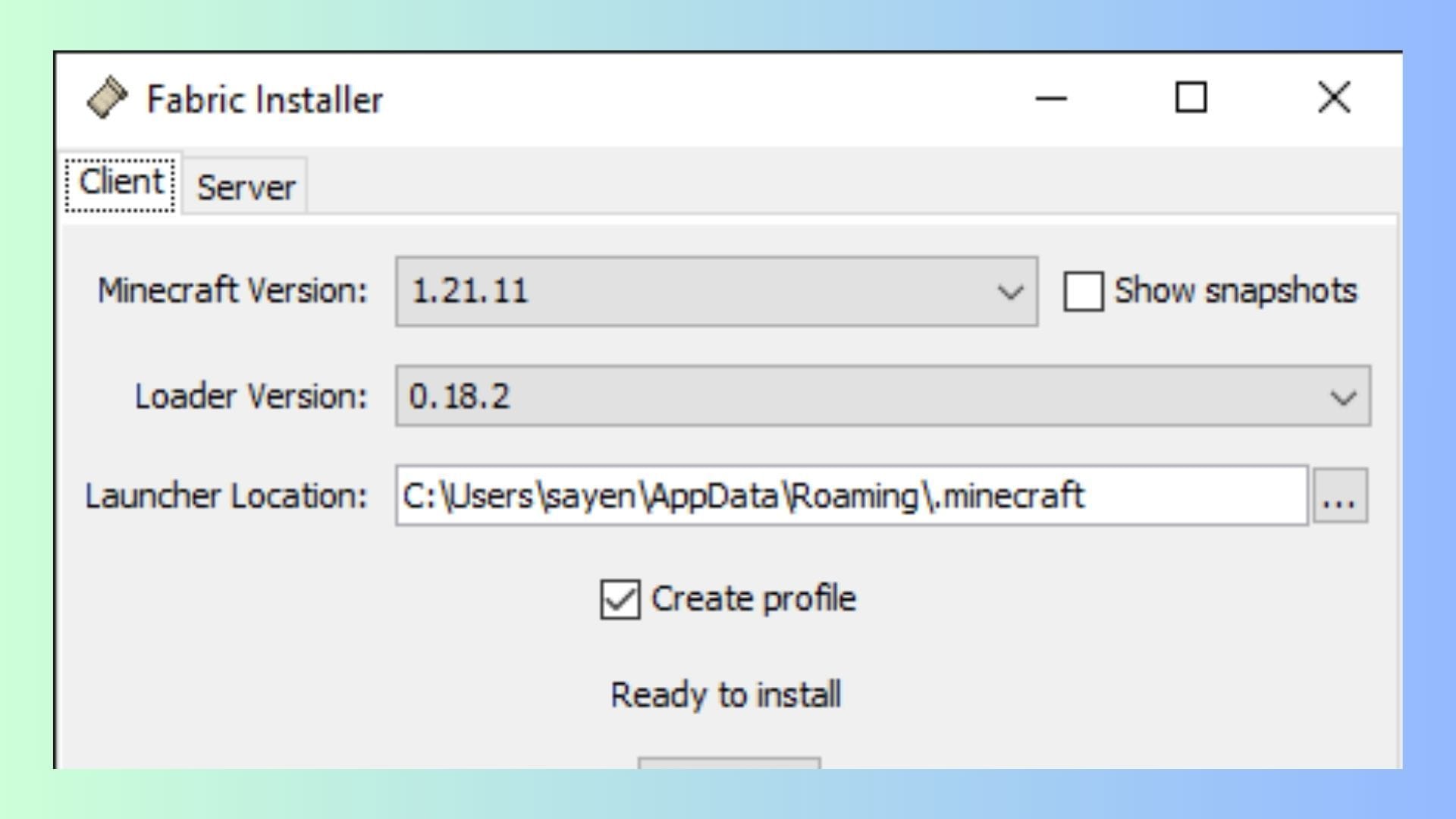
Chart New Territories with the ultimate Minecraft Seed Generator!
If you want to download and install Fabric, head over to the official Fabric website and get your hands on the latest build with support for Minecraft 1.21.11. Click on the blue "Download" button to download and save the executable file in a directory of your choice.
 Trending
Once downloaded, follow these steps to install Minecraft Fabric 1.21.11:
- Double-click or run the Fabric installer.
- On the installer, make sure the Minecraft version is displayed as 1.21.11. It is recommended that you set the Loader version to the system defaults.
- Next, select a directory to install the Fabric launcher. Ensure that the directory is set to your default Minecraft installation location and ends with ".minecraft".
- Once done, ensure the "Create Profile" option is checked/selected.
Once done, click the "Install" button and wait for Fabric to get installed.
Also read: Minecraft 1.22: The missing update fans waited for but never got
2) Verify the installation of Fabric 1.21.11

Once you are done installing the API, go to the Minecraft launcher and select the Java edition of the game. Now, click the dropdown menu and check to ensure it displays an instance of Minecraft with Fabric 1.21.11 installed.
When you run the instance with Fabric installed, you will get a message that the version might not support safety features: this is safe to ignore. Fabric is one of the most popular APIs used for Minecraft mods by millions of players worldwide. You can also check the box to prevent future warning dialogs from popping up.
Once installed, you can now install and run mods that require Minecraft Fabric 1.21.11 as a dependency. Just drag and drop the mods and additional dependencies in the mods folder to use them seamlessly. However, it is worth mentioning that some mods might require you to manually place the Fabric API in the mods folder to run properly.
Also read: New Minecraft version naming system explained
Check out our other Minecraft articles:
- How to get and use the Reese's Sodium Options mod
- Cool ways to use shelves
- How to get boss mob spawn eggs
- How to sort items using a copper golem
- 4 best mods to bring mobs to life
- All the Minecraft fishing enchantments explained

Uncover new worlds with our Minecraft Seed Generator!


