


'%20x='0'%20y='0'%20height='100%25'%20width='100%25'%20%0A%20%20%20%20%20%20%20%20%20%20xlink%3Ahref='data:image/jpg;base64,/9j/2wBDAAYGBgYHBgcICAcKCwoLCg8ODAwODxYQERAREBYiFRkVFRkVIh4kHhweJB42KiYmKjY+NDI0PkxERExfWl98fKf/2wBDAQYGBgYHBgcICAcKCwoLCg8ODAwODxYQERAREBYiFRkVFRkVIh4kHhweJB42KiYmKjY+NDI0PkxERExfWl98fKf/wgARCAAGAAoDASIAAhEBAxEB/8QAFQABAQAAAAAAAAAAAAAAAAAAAAX/xAAUAQEAAAAAAAAAAAAAAAAAAAAE/9oADAMBAAIQAxAAAABIBG//xAAgEAABAgUFAAAAAAAAAAAAAAABAgQAAwYREgUiJJLS/9oACAEBAAE/AEVvPeNxnpbS2Isdxg1Ask8Bp0V6j//EABkRAAIDAQAAAAAAAAAAAAAAAAIDAAEEEf/aAAgBAgEBPwB+rQLLEWXyf//EABcRAQADAAAAAAAAAAAAAAAAAAEAAhH/2gAIAQMBAT8Aamz/2Q=='%3E%3C/image%3E%3C/svg%3E)

Mojang has just released the latest Minecraft Bedrock 26.0.23 beta and preview on December 03, 2025. This is one of the first builds following the new numbering format, introducing modifications to mobs and upcoming features. Additionally, the build addresses persistent bugs and gameplay performance issues.
Here's how you can get your hands on the Minecraft Bedrock 26.0.23 beta and preview.

Guide to download the Minecraft Bedrock 26.0.23 beta and preview for all supported platforms
Xbox One and Series X/S consoles
Chart New Territories with the ultimate Minecraft Seed Generator!
You can download and check out the features and updates in the Minecraft Bedrock 26.0.23 beta and preview with a stable internet connection. Apart from possessing the Bedrock edition, you can also play this preview build if you have an active Xbox Game Pass subscription (regular or Ultimate edition) on your console.
 Trending
Here's how you can get the Minecraft Bedrock 26.0.23 beta and preview for your Xbox console:
- Make your way to the Xbox Game Store or your Game Pass Library on your preferred console.
- Open the game library and navigate to the search bar. Now, look for "Minecraft Preview."
- Once the preview edition is listed, select it and click on the "Install" button.
- Next, wait while the required game files and assets are successfully downloaded and installed. It is recommended to keep your console turned on and maintain a stable internet connection to prevent the installation files from becoming corrupted.
Also read: Minecraft finally announces new version numbering system following confusion from game drop releases
PlayStation 4 and 5
You can download and install the latest Minecraft Bedrock 26.0.23 beta and preview build on your PlayStation 4/5 console to check out the improvements to the upcoming features by following these steps:
- Open Minecraft from the homepage, the "Frequently Played" tab, or the game library on your PlayStation 4/5 console.
- Navigate to the left sidebar and go to the "Preview" button.
- Now, find and click the "Get PlayStation 4/5 Preview" button (depending on the console).
- Once done, select the "Download" button and wait for the required preview files to get installed on your console.
It is recommended to ensure the console has a stable internet connection and is not turned off during the installation. This prevents file corruption and unintended issues. Once installed, you can dive into the game and check out the newest features and changes in the Minecraft Bedrock 26.0.23 beta and preview.
Android/iOS devices
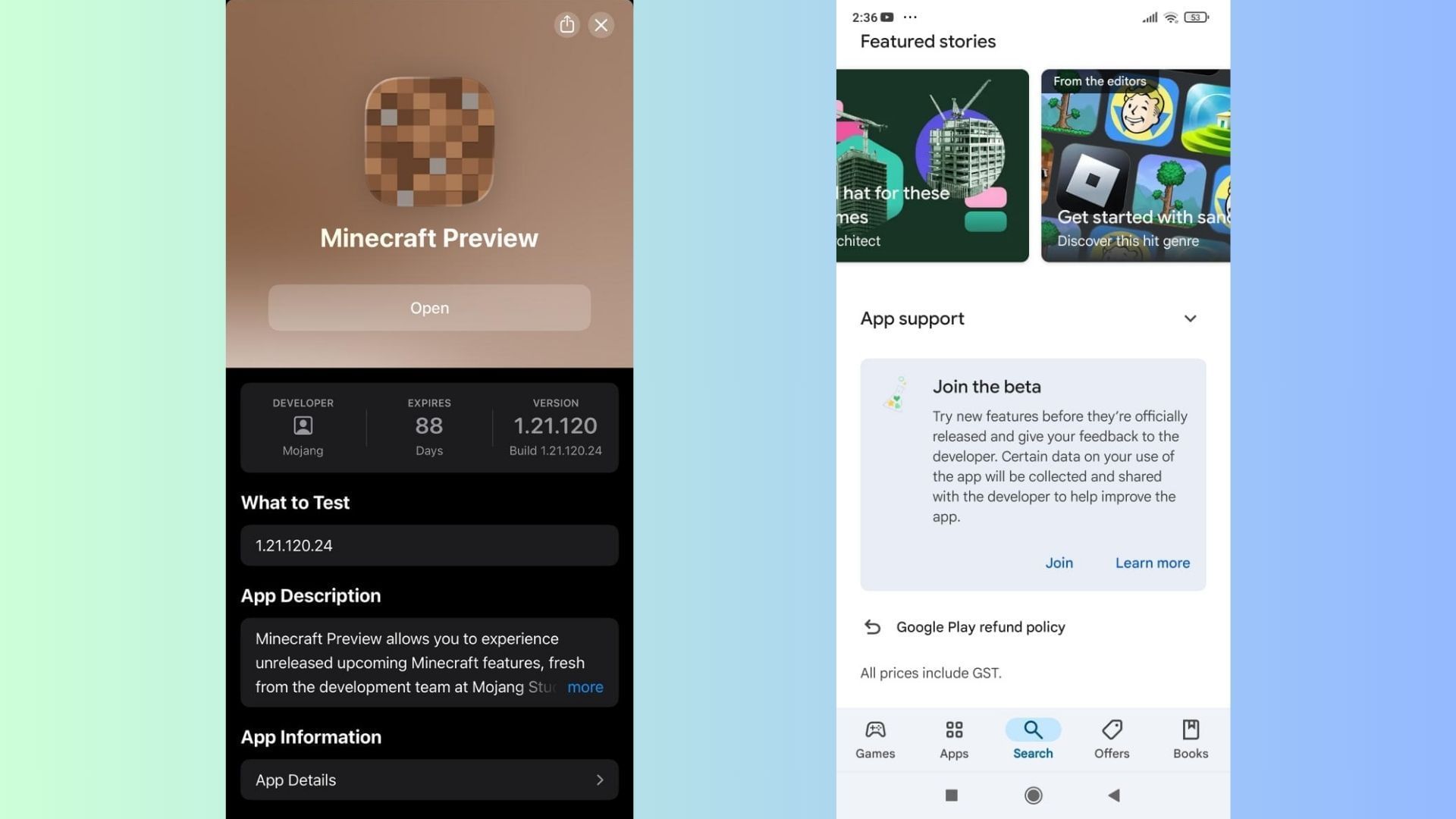
Just like console players, mobile gamers can also get their hands on these beta and preview builds for their devices. The seamless process allows Pocket Edition players to try out the Minecraft Bedrock 26.0.23 beta and preview on their Android and iOS devices alongside other platforms.
Here's how you can get your hands on the Minecraft Bedrock 26.0.23 beta and preview on your supported Android or iOS mobile devices:
Android
- Make your way to the Google Play Store application on your preferred Android device.
- Navigate to the Minecraft page or search for the game in the application's search bar.
- Once located, scroll down to the bottom of the store listing and tap the "Join the Beta" prompt.
- Next, wait for the beta build files to be downloaded and installed on your Android device.
- Once done, this will replace the installed release version with the Minecraft Bedrock 26.0.23 beta and preview.
iOS
- Download and install the TestFlight app from the App Store and then open the Minecraft preview's listing link. It is recommended to ensure there are free slots available for signing up for the build. If none are available, you will have to try again on the first of the next month.
- Sign up for the beta and preview using your registered Microsoft account. Now, wait till you receive an email on your linked ID with links to access the preview build.
- Next, open the email and select the "View in TestFlight" button. Alternatively, you can click and follow the attached link to open it on the TestFlight app.
- Choose "Install" (for new beta users) or "Update" (for existing users) to get the Minecraft Bedrock 26.0.23 beta and preview on your compatible iOS device.
- If you have an existing Preview build on iOS, simply open the TestFlight app and hit the update button next to the title. Once updated, you can now try the new features and changes in Minecraft Bedrock 26.0.23 beta and preview with ease.
Additionally, iOS players should play the preview build at least 1-2 times a month to retain access to this build. Since spots are limited, access is revoked after an extended period of inactivity. Logging in from time to time ensures continued access to future preview builds without needing to reregister.
Additionally, it is worth noting that most Android and iOS devices will have automatic updates enabled to ensure the applications and games are always on the latest versions. However, if this is not enabled or you prefer to queue the update manually, you can do so by heading to the individual app store (Android/iOS).
You will see that the "Open/Play" button will be replaced by "Update". Simply tap it and wait for the update to complete. Once done, you can enjoy the Minecraft Bedrock 26.0.23 beta and preview on your device with ease.
Also read: This Minecraft mod adds a heartfelt way to part with your dogs
Windows 10/11 PCs
The Minecraft Bedrock 26.0.23 beta and preview can be enjoyed on PCs if you have a copy of the Bedrock Edition. However, if you do not have the game purchased or installed on your preferred PC, you can obtain it from the Mojang website or the Xbox/Microsoft Store.
Once obtained, make sure to install the official game launcher in your preferred file directory and log in with your bound Microsoft account. This ensures that the game loads with the credentials that were used to purchase/obtain the title.
After the launcher is set up and you're successfully logged in with your preferred account, follow these steps to try out the latest features in the Minecraft Bedrock 26.0.23 beta and preview on your PC:
Note: This release will show up as version 26.0.24 on Windows devices.
For players with an existing Preview:
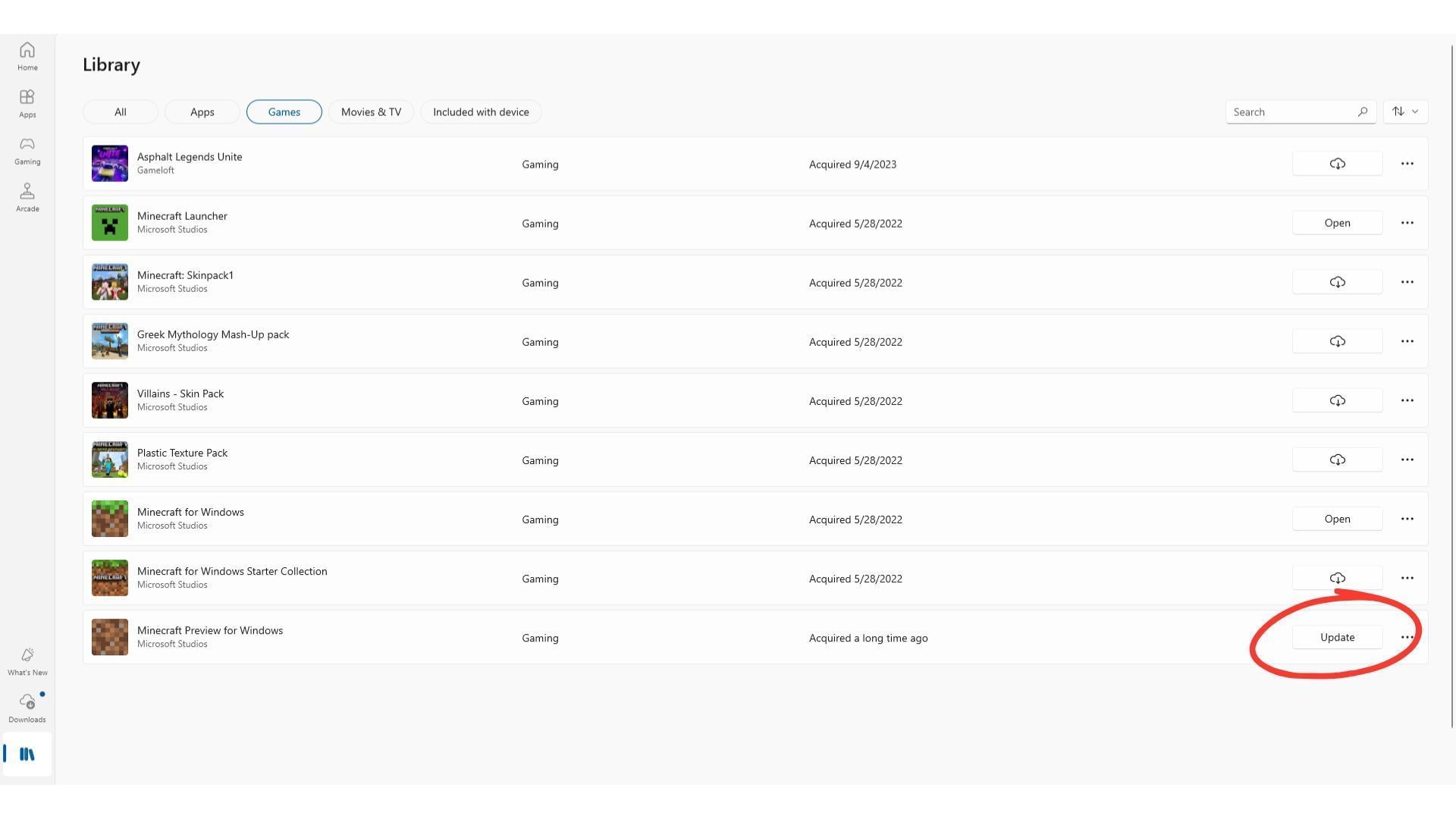
If you have an existing preview version like the Minecraft Bedrock 1.21.130.28 beta and preview installed, you will have to queue the update manually from the Microsoft Store.
Head over to the Microsoft Store on your preferred Windows device and manually queue the update for the Minecraft Bedrock 26.0.23 beta and preview by following these steps:
- On the Microsoft Store application, navigate to the tab marked 'Games' from the left sidebar and click on it.
- Scroll down or search for "Minecraft Preview" in the list of installed games on your PC.
- Now, click on the "Update" button next to the Preview listing and wait for the files to be installed. You can check the blue ring next to it for a progress update and estimate.
- If you do not see the "Update" button next to the game's Preview listing, click on the "Check for Updates" button in the top-right corner of the window. This will start a force check for all available updates on your device and locate them.
Apart from relying on the Microsoft Store, you can also use the installed Xbox application on your PC to download the Minecraft Bedrock 26.0.23 beta and preview on your pc.
Here's how you can get your hands on the 26.0.23 beta and preview using the Xbox application:
- Launch the application and make your way to the left sidebar, and locate the list of your installed games.
- Once found, select the Preview edition from the list and tap on 'Manage'.
- Next, hit the "Update" button at the top to download and install the Minecraft Bedrock 26.0.23 beta and preview.
Once done, you can try out the graphical changes and overhaul to mob behaviors introduced in the latest Minecraft Bedrock 26.0.23 beta and preview with ease.
For new Preview installations:
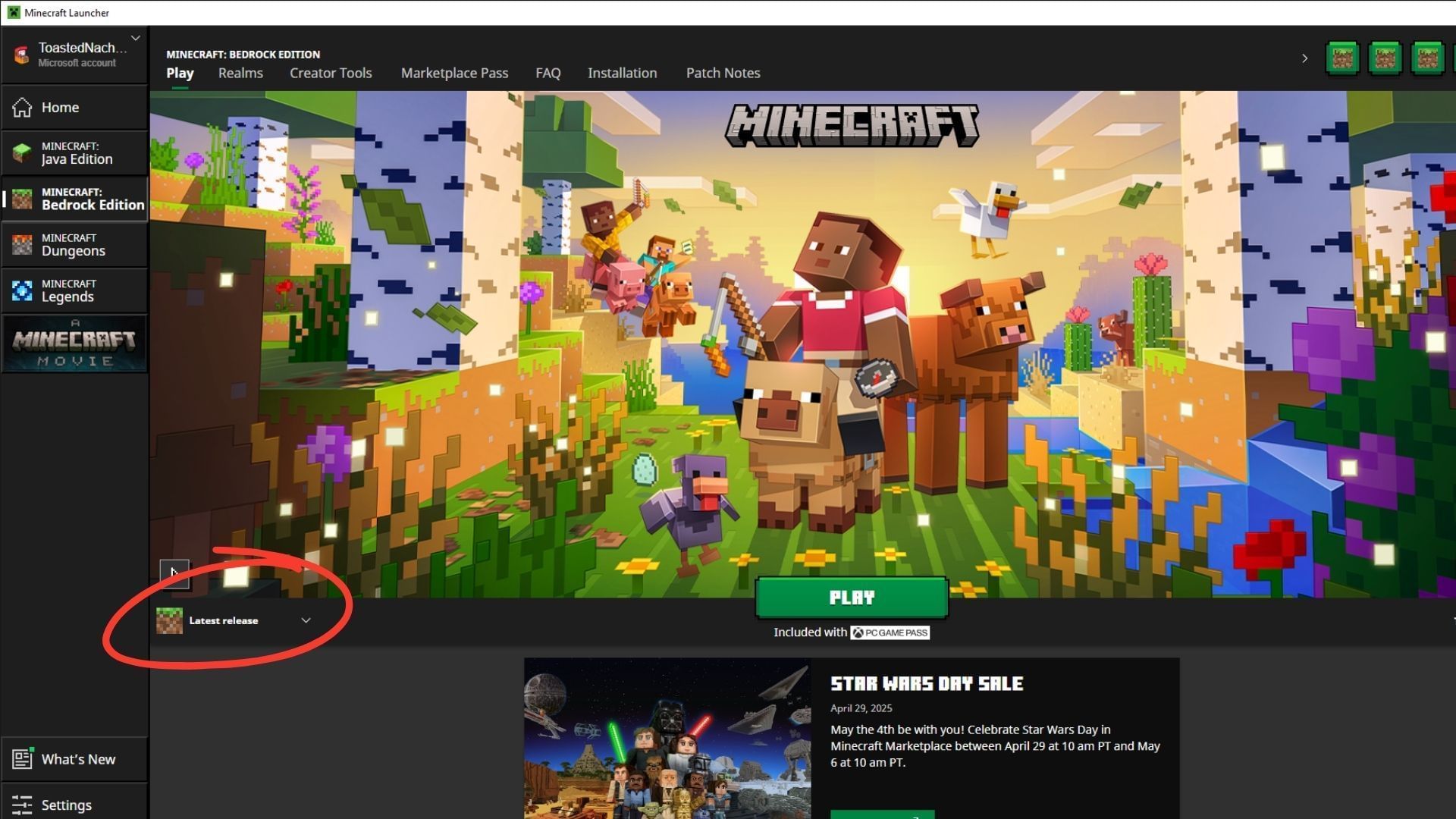
If this is your first time installing a Preview build on your Windows device, you must install the official game launcher to get started. Log in with your bound Microsoft account and choose the Bedrock edition from the list on the left sidebar.
Once done, follow these simple steps to install the Minecraft Bedrock 26.0.23 beta and preview successfully:
- Head over to the lower part of the launcher and expand the drop-down menu on the left marked "Latest Release," located next to the green "Play" button in the middle.
- Next, click on this drop-down to expand and open the list of available installation options. Ensure that you select the "Latest Preview" option below it.
- Once done, click the "Play" button to download and install the Minecraft Bedrock 26.0.23 beta and preview.
Since the preview build will be installed for the first time, it might take some time for all assets and files to get ready for use. Once done, you will be able to check out the new features and changes ahead of their release in upcoming drops and updates.
Also read: Minecraft 1.22: The missing update fans waited for but never got
Check out our other Minecraft articles:
- How to get and use the Reese's Sodium Options mod
- Cool ways to use shelves
- How to get boss mob spawn eggs
- How to sort items using a copper golem
- 4 best mods to bring mobs to life
- All the Minecraft fishing enchantments explained

Uncover new worlds with our Minecraft Seed Generator!


