


'%20x='0'%20y='0'%20height='100%25'%20width='100%25'%20%0A%20%20%20%20%20%20%20%20%20%20xlink%3Ahref='data:image/jpg;base64,/9j/2wBDAAYGBgYHBgcICAcKCwoLCg8ODAwODxYQERAREBYiFRkVFRkVIh4kHhweJB42KiYmKjY+NDI0PkxERExfWl98fKf/2wBDAQYGBgYHBgcICAcKCwoLCg8ODAwODxYQERAREBYiFRkVFRkVIh4kHhweJB42KiYmKjY+NDI0PkxERExfWl98fKf/wgARCAAGAAoDASIAAhEBAxEB/8QAFgABAQEAAAAAAAAAAAAAAAAAAAUG/8QAFAEBAAAAAAAAAAAAAAAAAAAABf/aAAwDAQACEAMQAAAAx0EFO//EAB0QAAEEAgMAAAAAAAAAAAAAAAECAwQRAAUxUbH/2gAIAQEAAT8Ab2EKRGjqbi0QVG1dDgEDDuGLNR/M/8QAGBEAAgMAAAAAAAAAAAAAAAAAAAIBEiL/2gAIAQIBAT8AZErGT//EABcRAQADAAAAAAAAAAAAAAAAAAEAAxH/2gAIAQMBAT8AsVdZ/9k='%3E%3C/image%3E%3C/svg%3E)

The Minecraft 1.21.11 update for Java Edition is out now. The much-awaited Mounts of Mayhem game drop introduces an array of features, such as the nautilus, parched, spear, and more. Additionally, it addresses persistent bugs and enhances existing mechanics to improve the gameplay experience for players.
Here's how to download the Minecraft 1.21.11 update and enjoy the Mounts of Mayhem game drop.

Guide to download the Minecraft 1.21.11 update for Java Edition
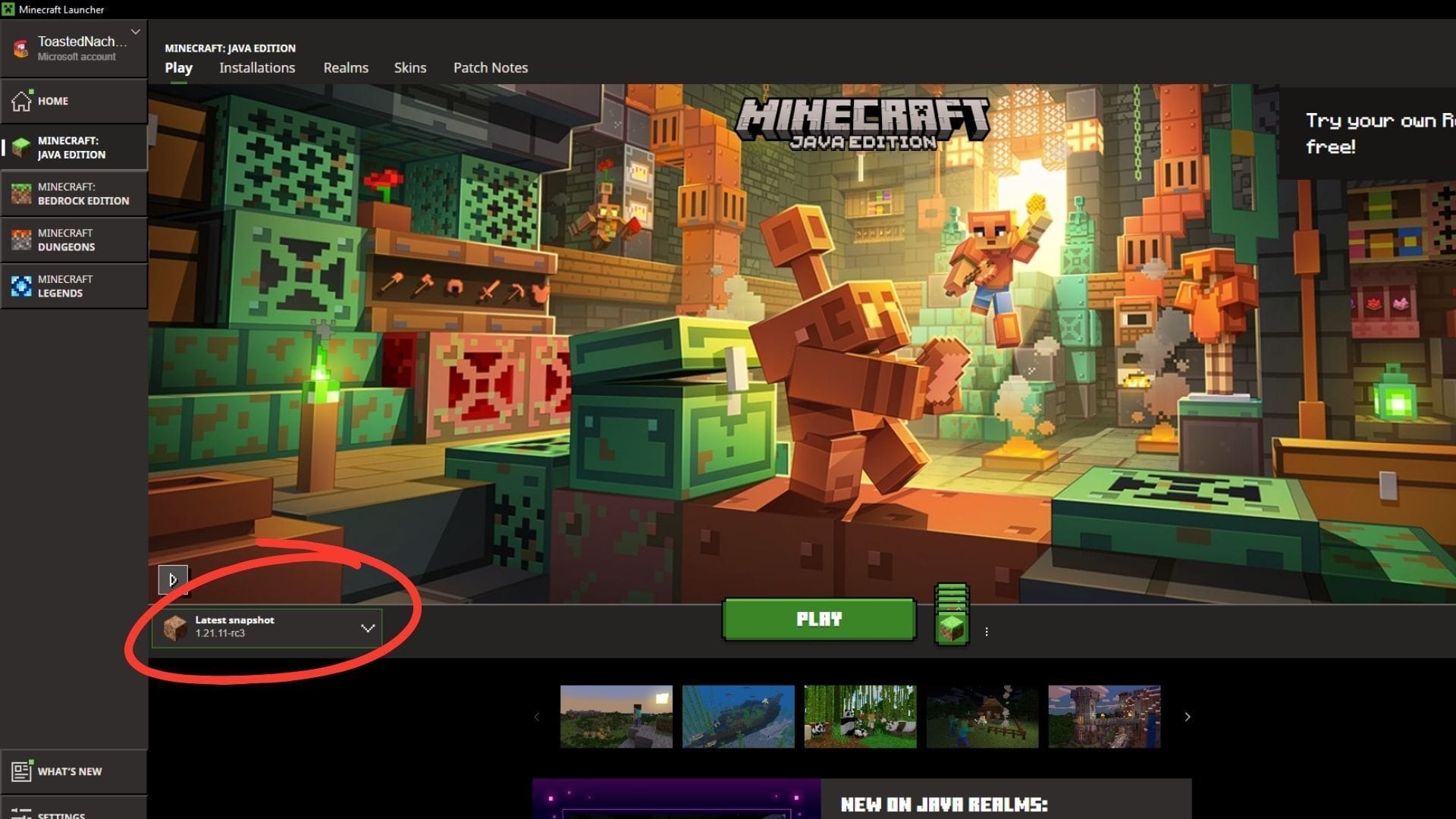
Chart New Territories with the ultimate Minecraft Seed Generator!
The Minecraft 1.21.11 update can be downloaded directly from the official launcher. In recent years, Mojang has turned it into an all-access point, allowing players to manage different instances across versions and even access spin-offs like Legends and Dungeons. The host of customization and ease of access make it a seamless way to manage all game content.
 Trending
By default, the launcher automatically checks for new Minecraft updates and hotfixes when you open it. If any updates are found, the launcher will automatically install them before the game starts. This nifty feature ensures players are always running the latest version and can access new features and changes.
However, you can queue the update for the Mounts of Mayhem game drop manually as well. The launcher lets players initiate updates on the existing version, upgrading it to the latest stable release.
Here's how you can get your hands on the Minecraft 1.21.11 update and enjoy the host of new features in the Mounts of Mayhem game drop:
- If this is your first time playing Minecraft or you do not have the launcher, head to the official website and download the launcher. You can also click here to access its download page.
- Once downloaded, run the executable file to install the launcher and sign in with your registered Microsoft account to get it ready for use.
- Now, open the launcher and select Minecraft: Java Edition from the left sidebar.
- On the lower side, go to the dropdown tab on the left of the green Play/Download button and expand it.
- Select the "Latest Release" option and make sure it shows 1.21.11. Next, click on the green Play button to begin the download.
- Wait for the launcher to download the required update files and assets.
You can track the installation progress through the green bar at the bottom, indicating how long until the game is ready.
Once the installation is complete, hit the green Play button to launch the game with the Minecraft 1.21.11 update successfully installed. A fresh installation will always download the latest available version, ensuring gamers get their hands on the newest stable release.
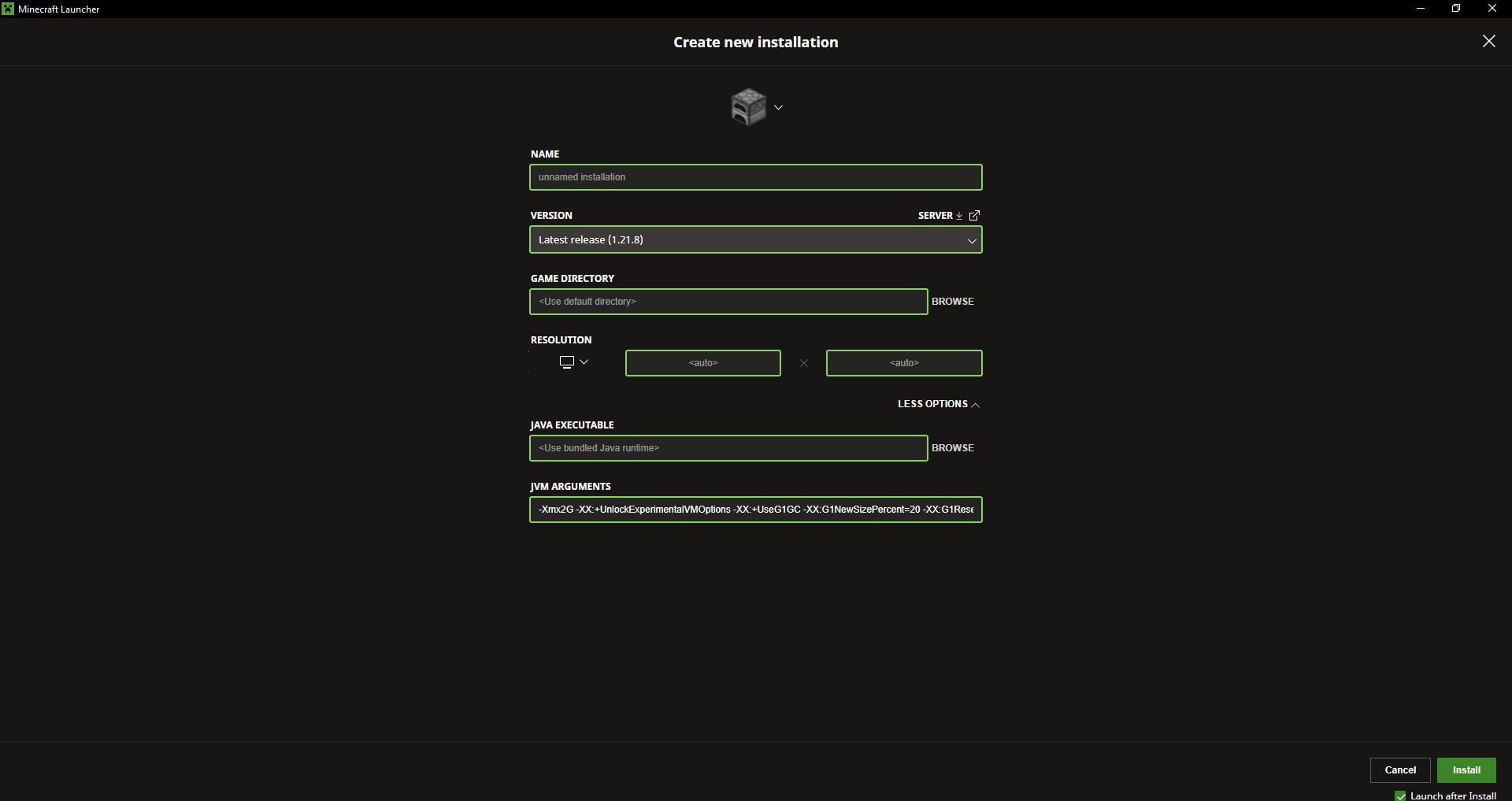
Additionally, you can also create a custom installation or instance of the Minecraft 1.21.11 update. These instances allow you to customize a host of gameplay aspects. They let you modify parameters, such as the display resolution, game directory, and even the JVM, allowing you to easily allocate more RAM to the instance and boost performance and reduce stutter.
Here is how to create a new custom installation of the Minecraft 1.21.11 update:
- Open the launcher and select Minecraft: Java Edition from the left sidebar.
- Navigate to the tab marked Installations next to Play, at the top.
- Now, click on the New Installation button under the search bar.
- Name your new instance and select the version. Make sure you select the Minecraft 1.21.11 update to experience the new features of the Mounts of Mayhem game drop.
- Once done, leave the Game Directory and Resolution slots blank if you wish to use the system defaults. However, you can customize them based on your gameplay preferences.
- Apart from this, you can select the More Options tab to open up additional customization options, such as accessing the JVM and allocating more RAM to your instance.
- You can also tap the icon on top to modify the logo of your instance. The game launcher offers an array of Minecraft-themed icons that you can select to personalize your instance to make it stand apart.
- However, it is recommended to ensure your device can handle the resolution and custom parameters. Make sure to input the values based on your system specifications.
Once done, click on the green 'Create' button located in the bottom-right corner to finish installing the instance with the Minecraft 1.21.11 update successfully. You can now check out the array of new features and new mobs introduced in the much-awaited drop.
Also read: New Minecraft version naming system explained
Check out our other Minecraft articles:
- How to get and use Reese's Sodium Options mod
- Cool ways to use shelves
- How to get boss mob spawn eggs
- How to sort items using a copper golem
- 4 best mods to bring mobs to life
- All the Minecraft fishing enchantments explained

Uncover new worlds with our Minecraft Seed Generator!


