


'%20x='0'%20y='0'%20height='100%25'%20width='100%25'%20%0A%20%20%20%20%20%20%20%20%20%20xlink%3Ahref='data:image/jpg;base64,/9j/2wBDAAYEBQYFBAYGBQYHBwYIChAKCgkJChQODwwQFxQYGBcUFhYaHSUfGhsjHBYWICwgIyYnKSopGR8tMC0oMCUoKSj/2wBDAQcHBwoIChMKChMoGhYaKCgoKCgoKCgoKCgoKCgoKCgoKCgoKCgoKCgoKCgoKCgoKCgoKCgoKCgoKCgoKCgoKCj/wgARCAAGAAoDASIAAhEBAxEB/8QAFQABAQAAAAAAAAAAAAAAAAAAAAH/xAAVAQEBAAAAAAAAAAAAAAAAAAABBP/aAAwDAQACEAMQAAAAtKz/xAAgEAACAgEDBQAAAAAAAAAAAAABAgMEEQAGEwcSITFB/9oACAEBAAE/AK28nNfkg51VlLhHbOUPz34Oo+pdWONUenZZ1GCe8a//xAAWEQEBAQAAAAAAAAAAAAAAAAABAFH/2gAIAQIBAT8AF2//xAAUEQEAAAAAAAAAAAAAAAAAAAAA/9oACAEDAQE/AH//2Q=='%3E%3C/image%3E%3C/svg%3E)

The Zenless Zone Zero 2.4 livestream premiered on November 14, 2025, and it teased a plethora of new content from the next patch. Besides showcasing the upcoming banner, events, and characters, the host has also shared a special redemption code. You can activate it with a simple redemption method to obtain 300x Polychrome and other resources for free.
This article further discusses the ZZZ 2.4 livestream code and its expiry time.
Zenless Zone Zero 2.4 livestream code, rewards, and expiry time
Looking for Crossword hints & solutions? Check out latest NYT Mini Crossword Answers, LA Times Crossword Answers, and Atlantic Crossword Answers
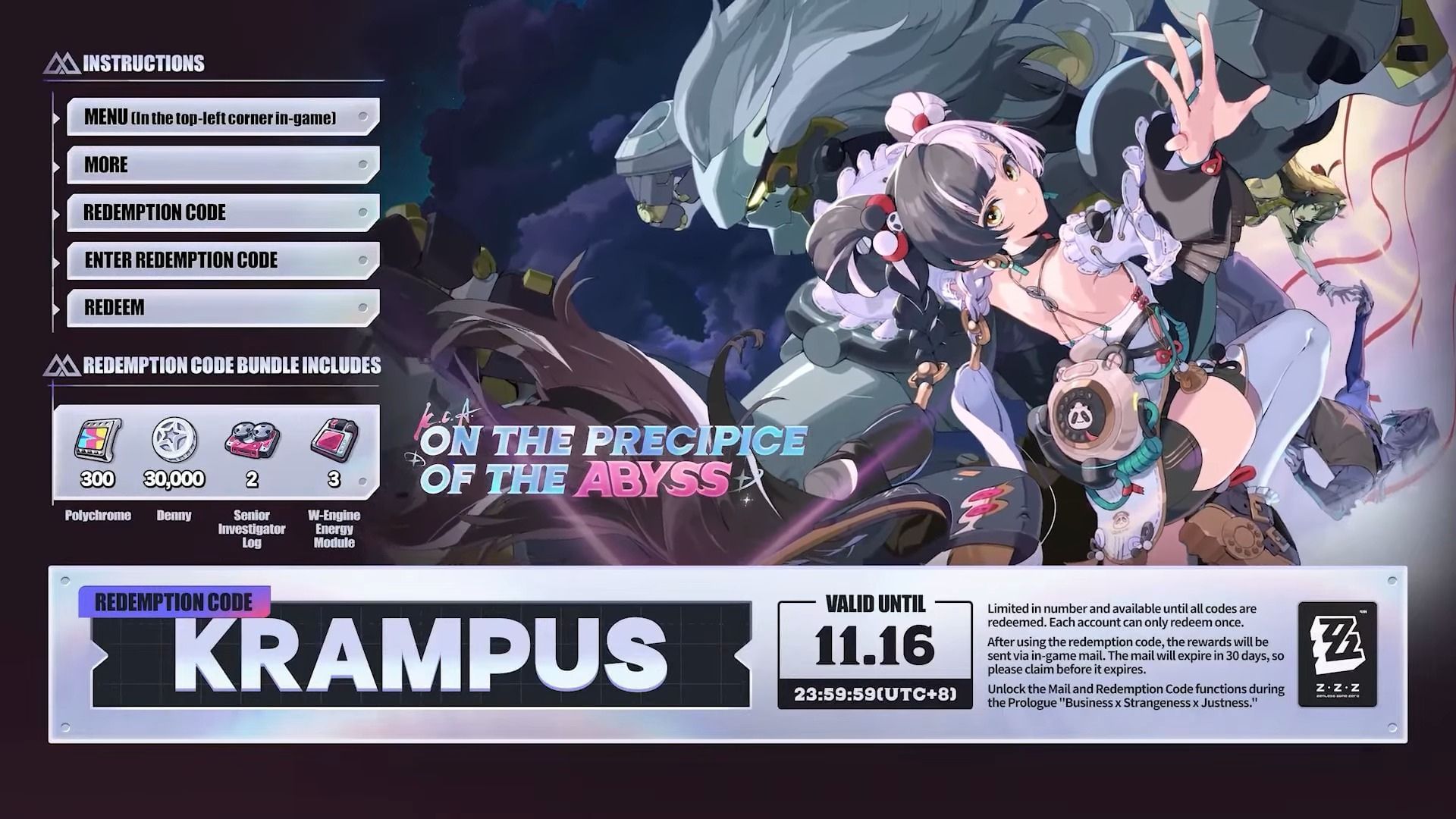
HoYoverse announced the Zenless Zone Zero 2.4 livestream code on November 14, 2025. Be sure to activate it to obtain the following rewards:
 Trending
- KRAMPUS: 300x Polychromes, 2x Senior Investigator Logs, 3x W-Engine Energy Modules, 30,000x Dennies
You have roughly 48 hours to obtain the specified reward. The officials have indicated that the ZZZ 2.4 livestream code will expire on November 16, 2025, at 11:59 PM (UTC+8). We recommend completing the redemption process at the earliest to avoid missing out on the free resources.
The following countdown will further help keep track of the time until the version 2.4 livestream code expires:
How to redeem Zenless Zone Zero 2.4 livestream code
HoYoverse lets you redeem any active Zenless Zone Zero code using either the in-game feature or the official webpage. Pick whichever process is more feasible:
Redeem on the official website

- Visit the official code redemption website.
- Log in to your account with the proper credentials.
- Pick the server if the webpage doesn't detect one automatically.
- Enter the livestream code in the empty box.
- Click on the Redeem button to activate the code.
Redeem in-game

- Launch the game on any device.
- Click on the Pause button once the character appears on the screen. Doing so will bring up the in-game menu.
- Navigate to More and click on Redemption Code to open a pop-up window.
- Insert the code in the empty dialogue box.
- Click "Redeem" to claim the rewards.
Redeem on the HoYoLAB app
- Open the HoYoLAB app.
- Choose ZZZ from the list of games.
- Head to the HoYoGuides section.
- Click the Redeem button beside the livestream code.
The rewards will be sent to your account via the in-game mailing system. To access the mailbox, click on the envelope icon within the Pause menu. Click the "claim all" button at the bottom to transfer the resources to your inventory.
Follow Sportskeeda's Zenless Zone Zero hub for more information and updates.

Are you stuck on today's Wordle? Our Wordle Solver will help you find the answer.


