



'%20x='0'%20y='0'%20height='100%25'%20width='100%25'%20%0A%20%20%20%20%20%20%20%20%20%20xlink%3Ahref='data:image/jpg;base64,/9j/2wBDAAYEBQYFBAYGBQYHBwYIChAKCgkJChQODwwQFxQYGBcUFhYaHSUfGhsjHBYWICwgIyYnKSopGR8tMC0oMCUoKSj/2wBDAQcHBwoIChMKChMoGhYaKCgoKCgoKCgoKCgoKCgoKCgoKCgoKCgoKCgoKCgoKCgoKCgoKCgoKCgoKCgoKCgoKCj/wgARCAAGAAoDASIAAhEBAxEB/8QAFQABAQAAAAAAAAAAAAAAAAAAAAb/xAAUAQEAAAAAAAAAAAAAAAAAAAAE/9oADAMBAAIQAxAAAACKgxp//8QAIRAAAQMDBAMAAAAAAAAAAAAAAQIDBQAEEQYSEyIhQXH/2gAIAQEAAT8AiNS2Mbp29jlxjTwSzhpe3acudXSe3sAY+U9bxCnVkM3YBUfHLX//xAAVEQEBAAAAAAAAAAAAAAAAAAAAAv/aAAgBAgEBPwC3/8QAFREBAQAAAAAAAAAAAAAAAAAAAAP/2gAIAQMBAT8Am//Z'%3E%3C/image%3E%3C/svg%3E)

Where Winds Meet has an optional multiplayer mode that allows a player to invite their friends in co-op and participate in different activities. This includes open-world exploration, boss battles, and challenge campaigns and outposts. Exploring the map and battling with friends in co-op will also earn you Intimacy and Adventure Slips.
This article provides a simple guide on how to unlock the co-op feature and play with friends in Where Winds Meet.
How to unlock co-op in Where Winds Meet
Unlocking co-op in Where Winds Meet is really simple, and you can do it simply by progressing through the main story. That said, the exact requirement to unlock it is still unclear.
Looking for Crossword hints & solutions? Check out latest NYT Mini Crossword Answers, LA Times Crossword Answers, and Atlantic Crossword Answers
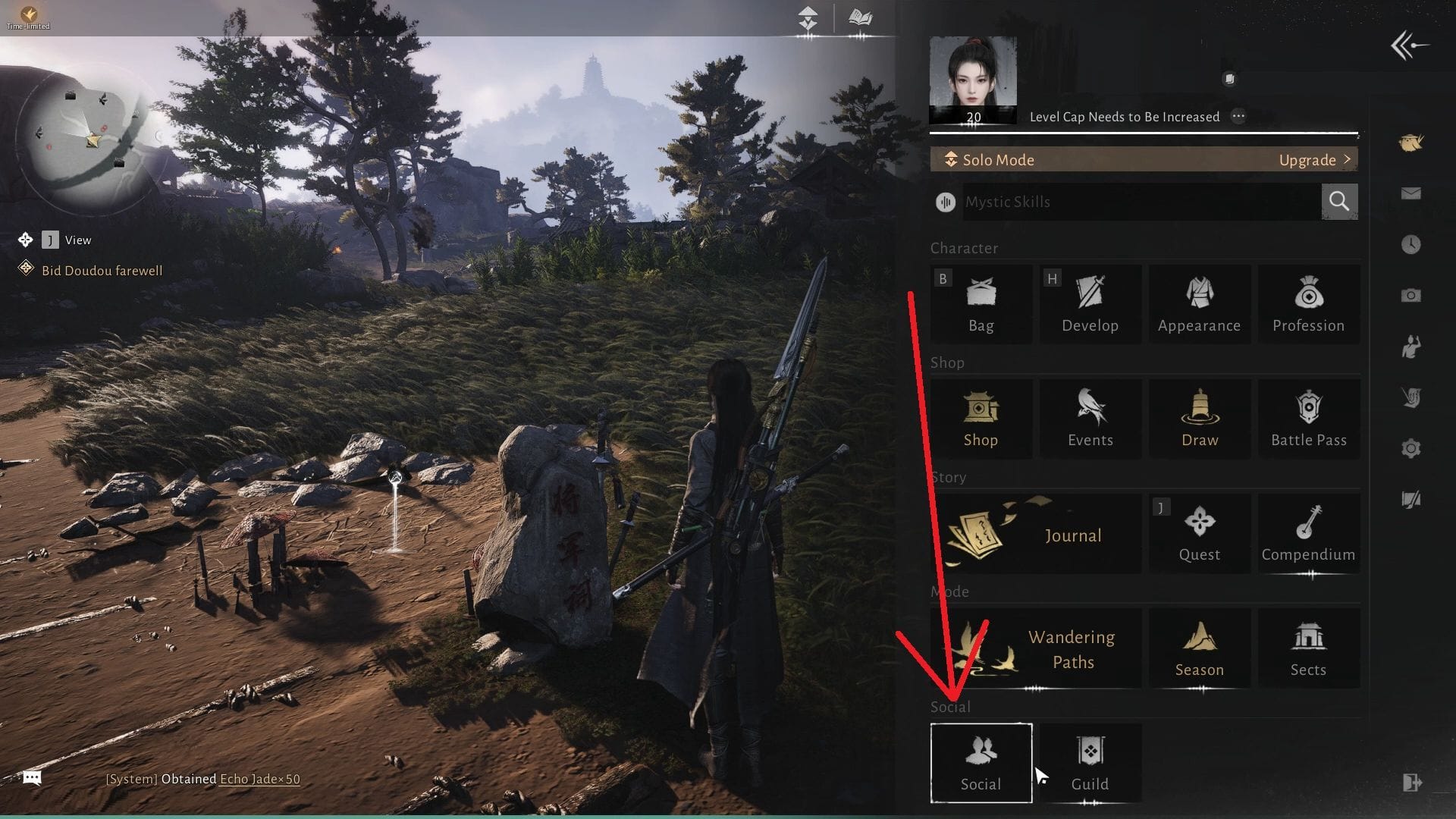
After talking to the Wayfarer and lighting up the Verdant Wilds' map, head west to find an NPC named Qi Sheng. Talk to him and accept his request. Once that is done, go west to find the General Shrine teleport stone and activate it. This should unlock the co-op feature, and you should now see a 'Social' option in the main menu. If it still doesn't appear, then you may need to raise your character's level in Where Winds Meet.
 Trending
How to add friends and play co-op in Where Winds Meet

After unlocking the co-op mode, open the main menu and follow these steps to add a new friend:
- Go to Social and click on Friend.
- Select Add Friend and enter your friend's ID or name.
- Click on the '+' icon to send the friend request and wait for them to accept it.
Alternatively, you can share your ID or name and ask your friend to send a request. You can find your ID at the bottom left corner of the screen.
Once you've friended another player, click on the Co-op button in Social and invite your friend to your world. Do note that you can only invite up to three other players at a time, and they must not be on another team or in co-op with another player.

You can also find multiplayer options in the Wandering Paths window in the main menu. You can fight bosses in the Challenges mode or just play Casual Co-op with your friends.
Check out our other Where Winds Meet articles:
- WWM redeem codes (November 2025)
- Weapon Skill guide: How to unlock and use them
- How (and why) to join a Guild
- How to unlock Inkwell Fan in WWM
- All Sects in Where Winds Meet
- How to defeat Sleeping Daoist in WWM

Are you stuck on today's Wordle? Our Wordle Solver will help you find the answer.


