Here are the best controller settings for Assetto Corsa Rally (Image via Sportskeeda Gaming ||Supernova Games Studios)
Assetto Corsa Rally is finally out, and gamers are diving into its tracks with their controllers and wheels. While the title features generic controller layouts, some specific tweaks and adjustments can make it easier for you to control your car and aim for the fastest laps.
Ad
Here are the best controller settings for Assetto Corsa Rally on Xbox controllers, Dualsense controllers, and wheels.
Assetto Corsa Rally best controller settings for Xbox controller
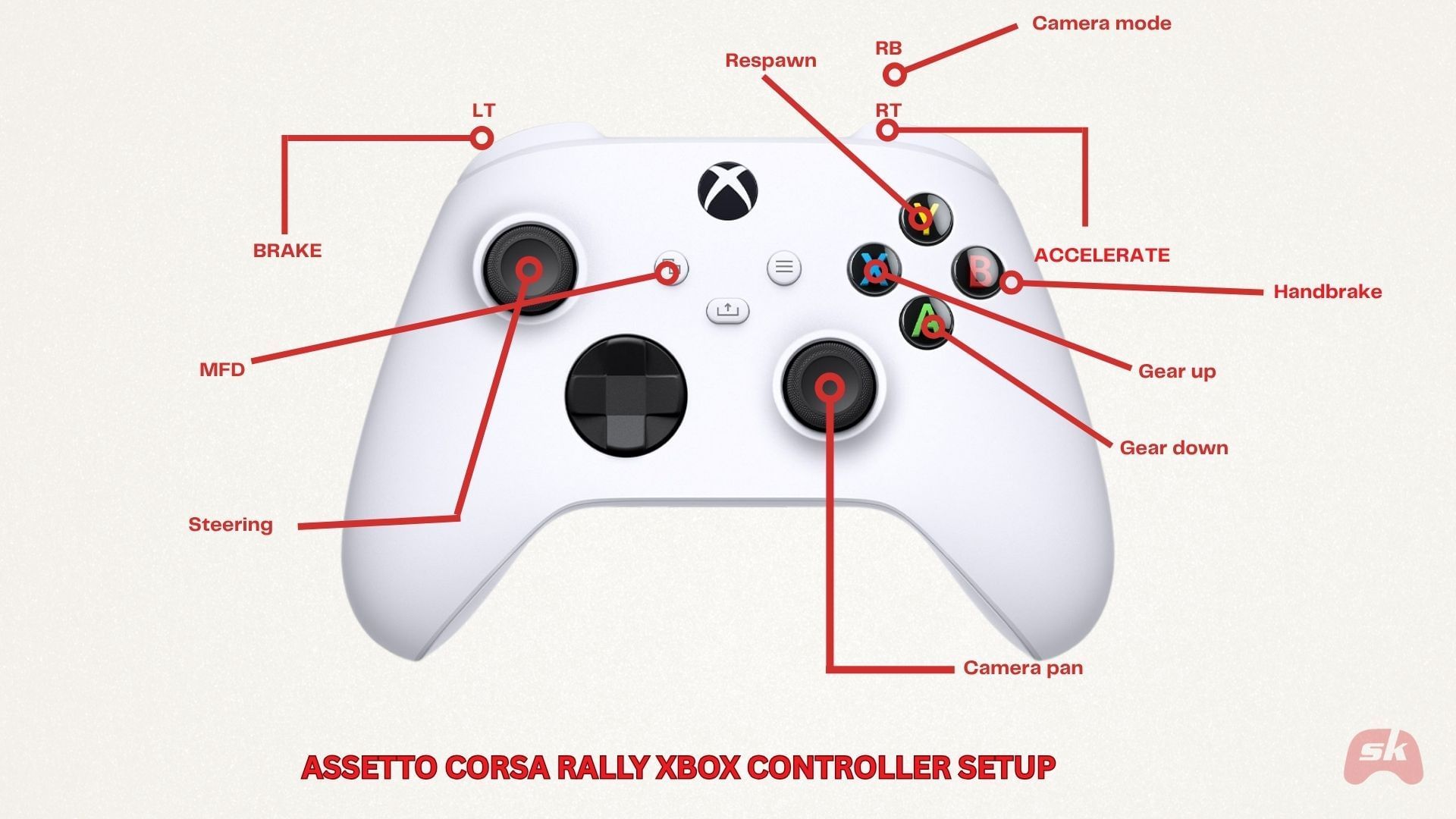
Here are the best keybindings for the Xbox controller (Image via Sportskeeda Gaming)
Xbox controllers are great for playing Assetto Corsa Rally, offering control and stability. While the default layout is great, you can use the keybindings shown in the image above to enhance your gameplay experience. Swapping the gear positions and MFD settings ensures you have easy access to the necessary settings.
Ad
Trending
As for the controller settings, the default parameters are great for casual playing. However, if you wish to squeeze the maximum output, here're the fine-tuned settings that enhance your steering precision while ensuring traction and smoother turns:
Setting
Recommended value
Result
Steering Linearity
1.3
Softer near the center for smoother control over minor adjustments
Steering Deadzone at Centre (change only if you have stick drift)
3–4
Removes stick drift without losing fine input
Low-end Throttle Deadzone
2–3
Avoids accidental throttle blips
Top-end Throttle Deadzone
0
Keeping it unchanged makes full power accessible
Low-end Brake Deadzone
2-3
Prevents unintentional braking
Top-end Brake Deadzone
0–1
Keeps max braking force intact.
Ad
Additionally, it is recommended to keep the steering linearity slightly above the default value to prevent accidental oversteer on minor stick flicks.
As for the Force Feedback, keep the Rumble Intensity between 80 and 100% and set the mode to Enhanced. This ensures you a more immersive gameplay experience.
Assetto Corsa Rally best controller settings for PlayStation Dualsense controller
Here are the best keybindings for the PlayStation Dualsense controller (Image via Sportskeeda Gaming)
The PlayStation Dualsense controller offers enhanced vibrations and an immersive gameplay experience, thanks to the fancy bells and whistles under its hood. Follow the layout mentioned above for easier access to settings such as gear shifting and camera mode adjustment.
Ad
As for the controller settings, you can implement the following for improved control, steering, and better braking behavior if the default settings feel too wonky. These settings take into account the shorter stick range as well as the adaptive triggers to ensure optimal performance:
Setting
Recommended value
Result
Steering Linearity
1.4
Slightly higher curve compensates for the shorter stick travel. Can be kept at default if it feels more comfortable
Steering Deadzone at Centre
2–3
DualSense sticks are tighter and small deadzone keeps it responsive.
Low-end Throttle Deadzone
4
Prevents false input if adaptive triggers are used. If not, keep at default
Top-end Throttle Deadzone
0
Allows full throttle without restriction.
Low-end Brake Deadzone
2–4
Compensates for early trigger activation zone.
Top-end Brake Deadzone
0
Keeps braking pressure linear to trigger feel, ensuring natural response
Force Feedback
80-90
Keeps the gameplay immersive without feeling ovebearing
Ad
Similar to the Xbox controller, it is recommended to keep the linearity slightly above the default value to prevent accidental oversteer on minor stick flicks.
As for the Force Feedback, keep the Rumble Intensity between 80 and 100%; the mode should be Enhanced. With this controller's powerful haptic feedback, you will feel every bump and grit on the road, offering a more immersive gameplay experience.
Assetto Corsa Rally best settings for Racing Wheels
Here are the best keybindings for racing wheels (Image via Sportskeeda Gaming)
Wheels are perhaps the best way to immerse yourself in Assetto Corsa Rally's admirable graphics and high-octane gameplay. Refer to the keybindings in the image above for the best experience.
Ad
While the default settings are great, you can tweak certain parameters to offer better traction and control. Adjusting factors such as deadzones and clutch balance yield a more seamless gameplay experience as you dive into the tracks of Alsace or Wales:
Setting
Recommended
Reason
Steering Linearity
1
Best to keep it at 1 for accurate steering.
Wheel Centre Offset
0
Keeps alignment neutral. You can adjust it slightly if the wheel pulls left/right while driving.
Low-end Throttle Deadzone
1-2
Prevents unwanted throttle signal and offers more precise control
Top-end Throttle Deadzone
0
Retains full acceleration range without any compromise
Invert Throttle
Off
Best not to touch unless your pedals have been inverted
Throttle Offset
0
Keep centered for a consistent response.
Low-end Brake Deadzone
2–4
Avoids unintentional input from light pressure.
Top-end Brake Deadzone
0–1
Keeps the full braking range usable.
Brake Gamma
1.4
Adds enhanced realism that offers a softer initial bite followed by a stronger and deeper press.
Invert Brake
Off
Standard configuration unless your pedals are inverted
Brake Offset
0
Neutral calibration to access the full range
Low-end Clutch Deadzone
1-2
Smoothens the clutch bite point for seamless shifting
Top-end Clutch Deadzone
0
Ensures full engagement.
Invert Clutch
Off
Standard configuration unless your pedals are inverted
Gearshift Debounce
50-100
Prevents double shifts and is ideal for sequential or H-pattern. If the delays are noticeable, reduce them till you are satisfied
Clutch Offset
0
Best to leave neutral unless your clutch engages unevenly.
Low-end Handbrake Deadzone
2-4
Avoids small unwanted pulls, especially when using custom shifters instead of buttons on the wheel
Top-end Handbrake Deadzone
0–1
Keeps full pull range active for intuitive braking and quick turns
Invert Handbrake
Off
Standard configuration unless your handbrake parameters are inverted
Handbrake Offset
0
Neutral by default. Best not to change
Ad
Apart from these settings, here are the best Force Feedback settings for Assetto Corsa Rally when you're playing with a racing wheel:
Setting
Recommended
Effect
Gain
75–85
Overall strength of FFB. This range gives you detailed surface feedback (gravel ruts, jumps) without clipping or exhausting you. It is recommended not to go higher than 90 since it often causes loss of fine detail.
Minimum Force
3–5
Prevents a “dead zone” around the center by boosting low-level feedback. Higher values can make the wheel twitchy and difficult to control
Damper
20–30
Adds resistance and smoothness to the wheel’s movement, which are essential for stability and handling in straights. Better to keep it low for enhanced realism.
Steering Lock
540°–720° (or 1080° if you want full realism)
Rally cars typically use ~540–720°. Lower lock offers faster steering transitions in tight stages, while a higher range feels more authentic but is marginally slower.



'%20x='0'%20y='0'%20height='100%25'%20width='100%25'%20%0A%20%20%20%20%20%20%20%20%20%20xlink%3Ahref='data:image/jpg;base64,/9j/2wBDAAYEBQYFBAYGBQYHBwYIChAKCgkJChQODwwQFxQYGBcUFhYaHSUfGhsjHBYWICwgIyYnKSopGR8tMC0oMCUoKSj/2wBDAQcHBwoIChMKChMoGhYaKCgoKCgoKCgoKCgoKCgoKCgoKCgoKCgoKCgoKCgoKCgoKCgoKCgoKCgoKCgoKCgoKCj/wgARCAAGAAoDASIAAhEBAxEB/8QAFgABAQEAAAAAAAAAAAAAAAAAAAQH/8QAFAEBAAAAAAAAAAAAAAAAAAAAAv/aAAwDAQACEAMQAAAAyCkQ/8QAIBAAAQMDBQEAAAAAAAAAAAAAAQIDBAARFBITIUFhgf/aAAgBAQABPwBTUhUZrDEdLenncBJ+Vkr7vfxRr//EABgRAAIDAAAAAAAAAAAAAAAAAAECAAMh/9oACAECAQE/ABWrDZ//xAAVEQEBAAAAAAAAAAAAAAAAAAAAEf/aAAgBAwEBPwCP/9k='%3E%3C/image%3E%3C/svg%3E)

 Trending


